
 EurekaCodes
MCP 설정 가이드
Requirements node. js uv 맥 사용자라면 brew install uv /. aws/amazonq/cli-agents/ 폴더 아래에 보면, default. json 파일이 존재합니다. (다른 이름으로 존재할 수도 있습니다. ) default.
Requirements
- node.js
- uv
- 맥 사용자라면
brew install uv
- 맥 사용자라면
Q Developer in CLI
~/.aws/amazonq/cli-agents/ 폴더 아래에 보면, default.json 파일이 존재합니다. (다른 이름으로 존재할 수도 있습니다.)
default.json 파일을 열어보면, 아래와 같이 되어 있고, 이 중 "mcpServers": 부분에 원하는 MCP 서버 내용을 복사 붙여 넣으면 됩니다!
{
"$schema": "https://raw.githubusercontent.com/aws/amazon-q-developer-cli/refs/heads/main/schemas/agent-v1.json",
"name": "default",
"description": "",
"prompt": null,
"mcpServers": {},
"tools": [
"*"
],
"toolAliases": {},
"allowedTools": [
"fs_read"
],
"resources": [
"file://AmazonQ.md",
"file://README.md",
"file://.amazonq/rules/**/*.md"
],
"hooks": {},
"toolsSettings": {},
"useLegacyMcpJson": true
}
```text
**예시#1 AWS Core MCP Server를 Q CLI에 등록**
- 공식 [홈페이지](https://awslabs.github.io/mcp/servers/core-mcp-server/)에서 사용법 익히기
- 아래 내용을 `"mcpServers": {}` 안에 붙여넣기
```javascript
"awslabs.core-mcp-server": {
"command": "uvx",
"args": [
"awslabs.core-mcp-server@latest"
],
"env": {
"FASTMCP_LOG_LEVEL": "ERROR",
"aws-foundation": "true",
"solutions-architect": "true"
},
"autoApprove": [],
"disabled": false
}
```text
3. Q CLI 재시작 `/quit` → `q chat`
4. MCP 서버 및 도구 확인 `/mcp` , `/tools`
```javascript
[default] > /mcp
awslabs.core-mcp-server
▔▔▔▔▔▔▔▔▔▔▔▔▔▔▔▔▔▔▔▔▔▔▔▔▔▔▔▔▔▔▔▔▔▔▔▔▔▔▔▔▔▔▔▔▔▔▔▔▔▔▔▔▔▔▔▔▔▔▔▔▔▔▔▔▔▔▔▔▔▔▔▔▔▔▔▔▔▔▔▔▔▔▔▔▔▔▔▔▔▔▔▔▔▔▔▔▔▔▔▔▔▔▔▔▔▔▔▔▔▔▔▔▔▔▔▔▔▔▔▔▔▔▔▔▔▔▔▔
✓ awslabs.core-mcp-server loaded in 9.22 s
[default] > /tools
Tool Permission
▔▔▔▔▔▔▔▔▔▔▔▔▔▔▔▔▔▔▔▔▔▔▔▔▔▔▔▔▔▔▔▔▔▔▔▔▔▔▔▔▔▔▔▔▔▔▔▔▔▔▔▔▔▔▔▔▔▔▔▔▔▔▔▔▔▔▔▔▔▔▔▔▔▔▔▔▔▔▔▔▔▔▔▔▔▔▔▔▔▔▔▔▔▔▔▔▔▔▔▔▔▔▔▔▔▔▔▔▔▔▔▔▔▔▔▔▔▔▔▔▔▔▔▔▔▔▔▔Built-in:
- execute_bash * trust read-only commands
- fs_read * trusted
- fs_write * not trusted
- report_issue * trusted
- use_aws * trust read-only commands
awslabs.core-mcp-server (MCP):
- prompt_understanding * not trusted
```text
**예시#2 Context 7 MCP Server를 Q CLI에 등록**
- 공식 [홈페이지](https://awslabs.github.io/mcp/servers/core-mcp-server/)에서 사용법 익히기
- 아래 내용을 `"mcpServers": {}` 안에 붙여넣기
```javascript
"context7": {
"command": "npx",
"args": ["-y", "@upstash/context7-mcp"]
}
```text
3. Q CLI 재시작 `/quit` → `q chat`
4. MCP 서버 및 도구 확인 `/mcp` , `/tools`
```javascript
[default] > /mcp
awslabs.core-mcp-server
▔▔▔▔▔▔▔▔▔▔▔▔▔▔▔▔▔▔▔▔▔▔▔▔▔▔▔▔▔▔▔▔▔▔▔▔▔▔▔▔▔▔▔▔▔▔▔▔▔▔▔▔▔▔▔▔▔▔▔▔▔▔▔▔▔▔▔▔▔▔▔▔▔▔▔▔▔▔▔▔▔▔▔▔▔▔▔▔▔▔▔▔▔▔▔▔▔▔▔▔▔▔▔▔▔▔▔▔▔▔▔▔▔▔▔▔▔▔▔▔▔▔▔▔▔▔▔▔
✓ awslabs.core-mcp-server loaded in 7.24 s
context7
▔▔▔▔▔▔▔▔▔▔▔▔▔▔▔▔▔▔▔▔▔▔▔▔▔▔▔▔▔▔▔▔▔▔▔▔▔▔▔▔▔▔▔▔▔▔▔▔▔▔▔▔▔▔▔▔▔▔▔▔▔▔▔▔▔▔▔▔▔▔▔▔▔▔▔▔▔▔▔▔▔▔▔▔▔▔▔▔▔▔▔▔▔▔▔▔▔▔▔▔▔▔▔▔▔▔▔▔▔▔▔▔▔▔▔▔▔▔▔▔▔▔▔▔▔▔▔▔
✓ context7 loaded in 13.07 s
[default] > /tools
Tool Permission
▔▔▔▔▔▔▔▔▔▔▔▔▔▔▔▔▔▔▔▔▔▔▔▔▔▔▔▔▔▔▔▔▔▔▔▔▔▔▔▔▔▔▔▔▔▔▔▔▔▔▔▔▔▔▔▔▔▔▔▔▔▔▔▔▔▔▔▔▔▔▔▔▔▔▔▔▔▔▔▔▔▔▔▔▔▔▔▔▔▔▔▔▔▔▔▔▔▔▔▔▔▔▔▔▔▔▔▔▔▔▔▔▔▔▔▔▔▔▔▔▔▔▔▔▔▔▔▔Built-in:
- execute_bash * trust read-only commands
- fs_read * trusted
- fs_write * not trusted
- report_issue * trusted
- use_aws * trust read-only commands
awslabs.core-mcp-server (MCP):
- prompt_understanding * not trusted
context7 (MCP):
- get-library-docs * not trusted
- resolve-library-id * not trusted
```text
### Q Developer in IDE
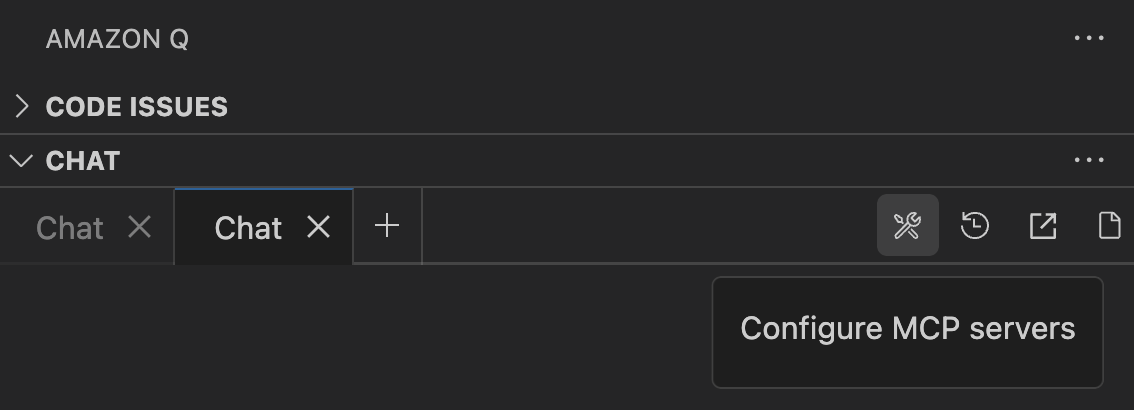
- Amazon Q > Chat > Configure MCP Servers 버튼 클릭
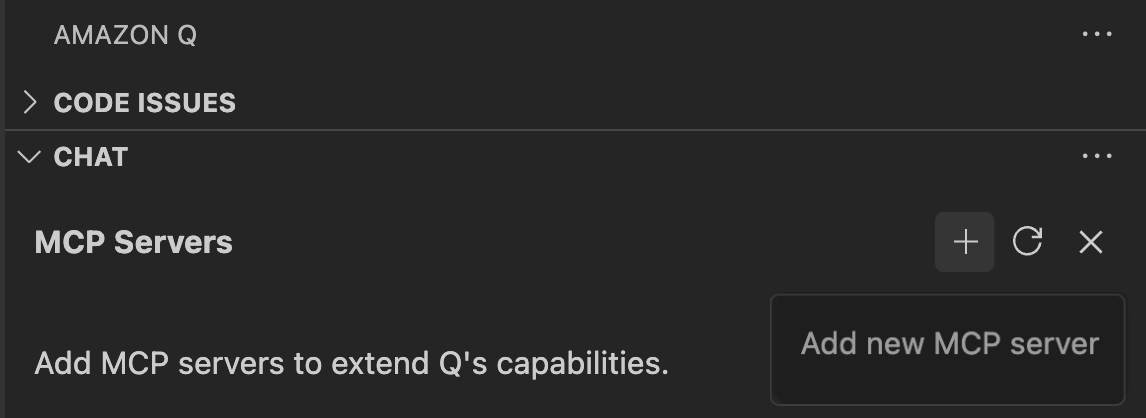
- Add new MCP server 버튼(+) 클릭
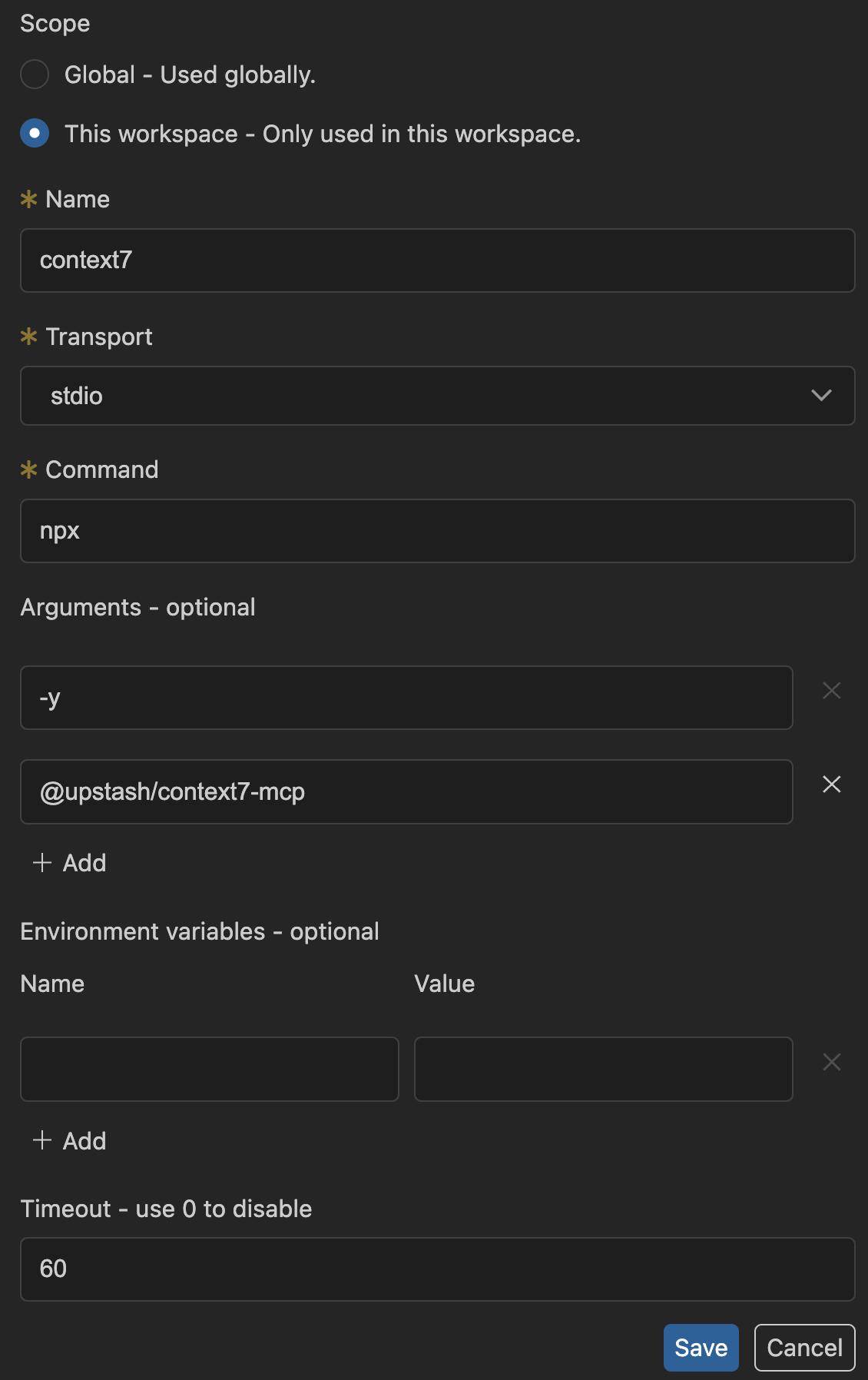
- JSON의 필드값을 확인하여 등록
```javascript
"context7": {
"command": "npx",
"args": ["-y", "@upstash/context7-mcp"]
}
```text
- 만약, MCP 등록 JSON이 위 처럼 되어있다면, 아래 처럼 등록하기!
- IDE에서 정상적으로 워크스페이스 단위의 MCP 서버가 등록되었다면, Q CLI 에이전트 설정 파일가 유사하게 생긴
`WORKSPACE/.amazonq/agents/default.json` 파일이 생성됨.
```javascript
{
"name": "default-agent",
"version": "1.0.0",
"description": "Agent configuration",
"mcpServers": {
"awslabs.core-mcp-server": {
"command": "uvx",
"args": [
"awslabs.core-mcp-server@latest"
],
"env": {
"FASTMCP_LOG_LEVEL": "ERROR",
"aws-foundation": "true",
"solutions-architect": "true"
},
"disabled": false
},
"aws-knowledge-mcp-server": {
"command": "npx",
"args": [
"mcp-remote",
"https://knowledge-mcp.global.api.aws"
],
"disabled": false
},
"context7": {
"command": "npx",
"disabled": false,
"timeout": 60000,
"args": [
"-y",
"@upstash/context7-mcp"
]
}
},
"tools": [
"@awslabs.core-mcp-server",
"@aws-knowledge-mcp-server",
"@context7"
],
"allowedTools": [
"@awslabs.core-mcp-server/prompt_understanding",
"@aws-knowledge-mcp-server/aws___read_documentation",
"@aws-knowledge-mcp-server/aws___recommend",
"@aws-knowledge-mcp-server/aws___search_documentation"
],
"toolsSettings": {},
"includedFiles": [],
"resources": []
}
```text
---
> 다른 MCP 서버들도 등록해 보세요!
다른 MCP 서버들도 등록해 보세요!
추천하는 MCP 서버:
- AWS Core MCP Server
- AWS Knowledge MCP Server
- Context 7 MCP Server ← 소프트웨어 공식 문서 참조
- Tavily MCP Server ← 웹 검색
- GitHub MCP Server ← 코드 저장소 관련
- Playwright MCP Server ← 브라우저 테스트
[https://awslabs.github.io/mcp/](https://awslabs.github.io/mcp/)